Getting Started
Get started with CyberYozh API in just a few steps.
1. Register an Account
Create your account at https://app.cyberyozh.com or https://app1.cyberyozh.com
2. Generate an API Key
- Log in to your account
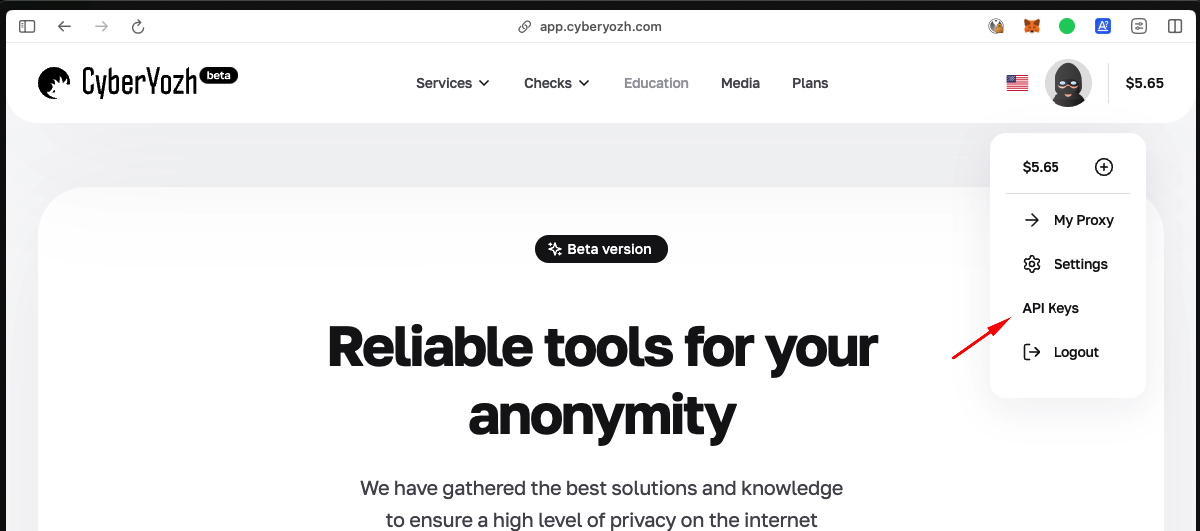
- Navigate to your profile menu
- Select the "API Keys" section
- Generate a new API key
3. Explore Swagger Documentation
Full interactive API documentation is available at:
https://app.cyberyozh.com/docs/
4. Make Your First Request
Try retrieving your available proxies:
curl -X 'GET' \
  'https://app.cyberyozh.com/api/v1/proxies/shop/' \
  -H 'accept: application/json' \
  -H 'X-Api-Key: your_api_key_here'
Next Steps
Best Practices
- Keep your API key secure - Never commit it to version control
- Handle rate limits - Implement retry logic for 429 responses
- Check response status - Always verify the success of operations
- Monitor your balance - Keep track of your account balance to avoid service interruptions